
Managed IT services for Sydney businesses

One team looks after your users, devices, Microsoft 365, network and internet. Your staff get a help desk they can reach, and you get a plan that stops the same problems coming back.
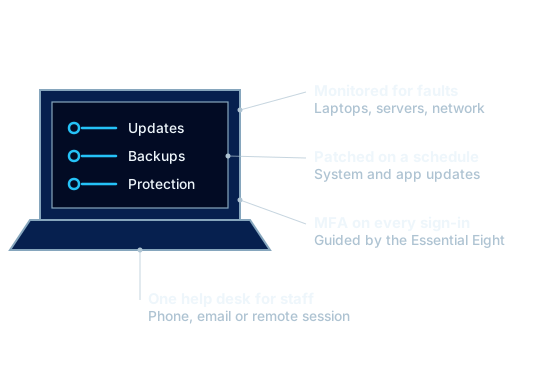
A managed laptop with updates, backup and protection status
What a managed device looks like to our help desk.

What managed IT support means

Most small businesses buy IT by the hour: something breaks, someone is called, an invoice arrives. That model pays the provider more when you have more problems.

Managed IT services turn that around. You pay a set monthly fee and we take responsibility for keeping your systems working, secure and up to date. Fewer faults is the goal for both of us.

Because Spartan also supplies your internet, phones, licences and hardware, one team can see the whole picture. When a video call stutters we can check the laptop, the Wi-Fi, the switch and the fibre without handing you to another company.

At a glance

Service
Ongoing IT support and management
Covers
Users, devices, servers, cloud and network
Support
Phone, email and remote session, on site across Sydney
Pricing
From $100 per user, per month, ex GST
Suits
Small and mid-sized offices, multi-site businesses

Managed IT plans and pricing

Three plans, priced per user. Most clients start on Secure. You can move between plans as your needs change.

Core

$100per user, per month (ex GST)

Suitable for

Small offices that mainly need dependable support.

  • Help desk by phone, email and remote session
  • Device monitoring and patching
  • Microsoft 365 administration
  • Monthly support report
Enquire now

Secure

$140per user, per month (ex GST)

Suitable for

Businesses that handle client data or need cyber insurance.

  • Everything in Core
  • Endpoint protection and email filtering
  • MFA and access policies
  • Backup of Microsoft 365 and key devices
  • Quarterly IT review
Enquire now

Complete

$180per user, per month (ex GST)

Suitable for

Multi-site and fast-growing teams.

  • Everything in Secure
  • On-site visits included
  • Network and Wi-Fi management
  • Vendor management
  • IT plan and budget
Enquire now

Prices are per user, per month and exclude GST. We confirm the final figure after a site review. Projects and new hardware are quoted separately.

The security baseline we work to

The Australian Signals Directorate publishes eight mitigation strategies known as the Essential Eight. They are the yardstick most cyber insurers and larger clients now ask about, and they shape how we set up every managed environment.

Patch applications
Browsers, Office and other software kept up to date so known holes are closed.
Patch operating systems
Windows and macOS updates applied on a schedule, with unsupported versions replaced.
Multi-factor authentication
A second step at sign-in for email, remote access and admin accounts.
Restrict administrator privileges
Staff work in standard accounts. Admin rights are separate and limited.
Application control
Only approved programs are allowed to run on business devices.
Restrict Office macros
Macros from the internet are blocked, which removes a common way in for malware.
User application hardening
Risky browser and document features switched off.
Regular backups
Important data backed up, kept separate and restored in tests.

What is included in our managed IT service

Help desk support
Staff call or email one number and speak to someone who knows your setup. Most issues are fixed by remote session while they wait.
Monitoring and patching
Workstations, servers and network gear are monitored for faults. Operating system and application updates are tested and applied on a schedule.
Cyber security
Multi-factor authentication, endpoint protection, email filtering and access controls, guided by the Australian Signals Directorate's Essential Eight.
Backup and recovery
Backups of Microsoft 365, servers and key workstations, with restores tested so you know they work before you need them.
Microsoft 365 management
Mailboxes, Teams, SharePoint, OneDrive and licences set up and looked after, including new starters and leavers.
Network and Wi-Fi
Routers, firewalls, switches and access points configured, documented and kept on current firmware.
Vendor management
We deal with your software vendors, printer supplier and carriers on your behalf, so staff have one place to ask.
IT planning and budgeting
Regular reviews of what is ageing, what is at risk and what it will cost, so replacements are planned and not emergencies.
On-site visits
A technician on site across Sydney when a job cannot be done remotely, from a failed switch to a full desk move.

Who managed IT suits

  • Offices with no in-house IT person, or one who is stretched
  • Businesses that have outgrown a break-fix technician
  • Multi-site businesses that need the same standard everywhere
  • Teams that handle client data and need security they can evidence
  • In-house IT teams that want a partner for after-hours cover, projects or connectivity

How we take over your IT

  1. Review

    We audit your devices, accounts, licences, network and backups, and give you a written report of what we found.

  2. Onboard

    We document your environment, install monitoring and security tools, and fix the urgent gaps first.

  3. Support

    Your staff start using the help desk. Faults are logged, tracked and reported back to you each month.

  4. Improve

    We meet regularly to agree priorities, plan upgrades and keep the budget predictable.

Managed IT questions

What do managed IT services include?

A managed IT service normally covers help desk support, monitoring, patching, security, backup and management of Microsoft 365 and your network. Our agreement lists every inclusion in plain terms so you can see what is covered and what would be quoted separately as a project.

How are managed IT services priced?

We price per user, per month. Plans start at $100 per user ex GST for Core, $140 for Secure and $180 for Complete. The final figure depends on your devices, sites and security needs, and is confirmed after a site review.

Do you provide on-site IT support in Sydney?

Yes. Most requests are resolved remotely because that is fastest, and a technician attends your Sydney site when hands are needed on equipment.

Can you take over from our current IT provider?

Yes. We handle the handover with your current provider, collect passwords and documentation, and check that nothing has been missed before the changeover date. Staff should not notice anything except a new support number.

We already have an IT person. Can you work with them?

Yes. Co-managed IT is common. Your in-house person keeps the work they want and we cover the rest, such as monitoring, security tooling, leave cover, connectivity or projects.

Talk to us about managed it

Tell us about your site and what you need. We reply with options and pricing in writing.

OfficeLevel 35, Tower One, International Towers Sydney
100 Barangaroo Avenue
Barangaroo NSW 2000

For internet and fibre enquiries, add the site address so we can check what reaches your building.